
Agentic Quality
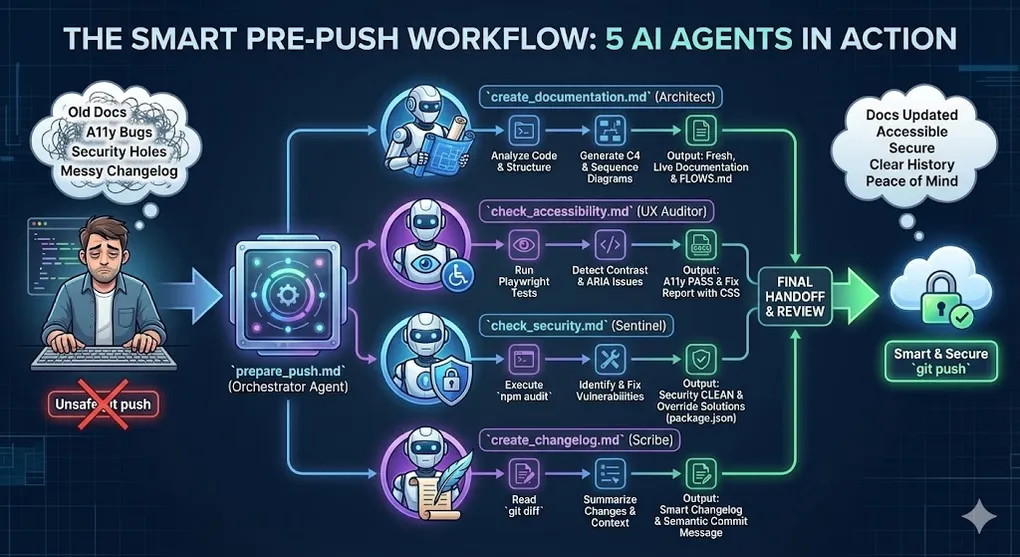
With the acquisition of skills in creating agents, it becomes almost natural to want to perform checks on your own code to validate its quality. I experimented with creating a battery of agents to help me validate code across different aspects, and I tested it on my blog’s codebase.
I conducted this experiment with Antigravity workflows.
System Overview
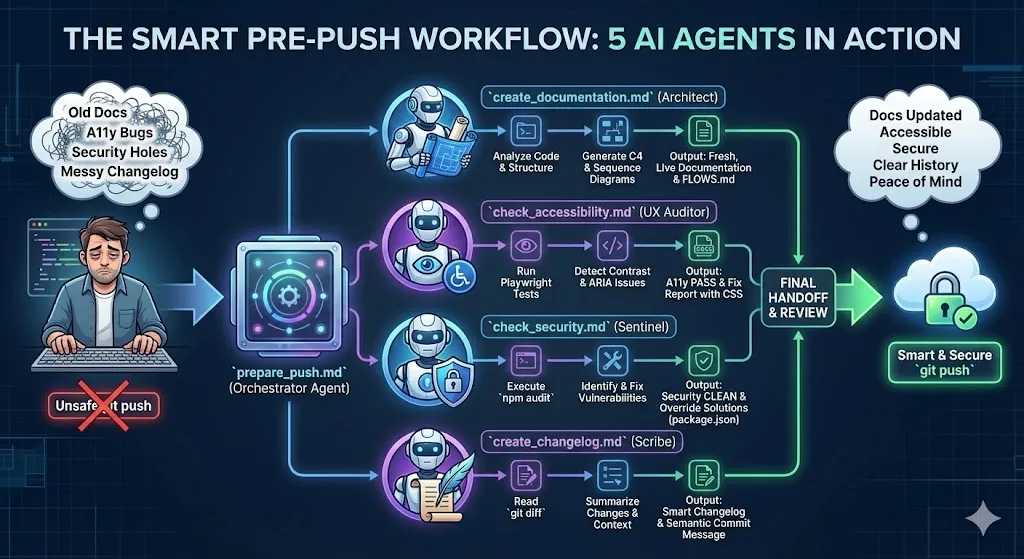
This system uses a series of workflows defined in Markdown files (.md) to instruct an AI assistant (e.g., integrated into an IDE or running locally). The system operates according to an Orchestrator-Worker pattern: a main agent coordinates the sequential execution of specialized agents before allowing code commit and push.
Directory Structure
All configuration files must reside in the .agent/workflows directory:
.agent/workflows/
├── prepare_push.md          # (Orchestrator) Entry point del processo
├── create_documentation.md  # (Worker) Generazione diagrammi e docs
├── create_changelog.md      # (Worker) Analisi diff e commit message
├── check_security.md        # (Worker) Audit vulnerabilità npm
└── check_accessibility.md   # (Worker) Test UX/A11y automatizzati`
2. Orchestrator Configuration
The prepare_push.md file is the entry point. It doesn’t execute direct operational tasks but manages the logical flow and dependencies between steps.
Execution Logic:
- Documentation Trigger: Ensures diagrams reflect the current code.
- Changelog Generation: Creates a summary of changes (including documentation updates).
- Accessibility Audit: Verifies WCAG/EAA compliance.
- Security Audit: Scans dependencies.
- Handoff: Proposes the final commit message.
---
description: Orchestrates the pre-push process by orchestrating documentation and changelog updates.
---

# Prepare Push Workflow

This workflow acts as an orchestrator to prepare your codebase for a `git push`. It sequentially triggers specialized agents to ensure your repository is documented and a changelog is present.

## 1. Update Documentation
- **Action**: Execute the logic defined in `@create_documentation`.
- **Goal**: Ensure documentation reflect the latest changes in the codebase.
- **Note**: If documentation already looks up-to-date with recent changes, you can skip rewriting it, but verify first.

## 2. Generate Changelog
- **Action**: Execute the logic defined in `@create_changelog`.
- **Goal**: Analyze the diffs (including the newly updated documentation from step 2), create a changelog entry, and propose a commit message.

## 3 Accessibility
- **Action**: Execute the logic defined in `@check_accessibility`.
- **Goal**: Analyze the EAA

## 4. Security Check
- **Action**: Execute the logic defined in `@check_security`.
- **Goal**: Ensure no critical vulnerabilities are introduced.

## 5. Final Handoff
- Present the proposed a verbose commit message to the user for final approval.
3. Worker Agent Specifications
3.1 Documentation Agent (Architect)
- File:
create_documentation.md - Role: Senior Software Architect.
- Function: Analyzes code to produce technical documentation in Markdown and Mermaid diagrams.
- Required Outputs:
- Updated
README.md. - C4 Context/Container diagrams.
- Sequence Diagrams for critical flows.
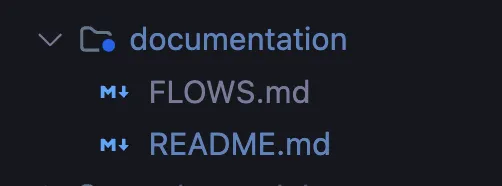
FLOWS.mdfile for functional descriptions.
- Updated
- Technical Note: The agent must use consistent nomenclature and highlight technical debt.
---
description: Analyze code and generate documentation
---

## Context
You are a senior software architect specialized in reverse engineering and technical documentation. You must analyze this legacy multi-repository project to produce comprehensive documentation in Markdown format with Mermaid diagrams.

## Objectives
1. **Architectural understanding** - Identify the overall system structure
2. **Flow mapping** - Document the main application flows
3. **Dependency analysis** - Map relationships between repositories/modules
4. **Technical documentation** - Generate readable and maintainable documentation
5. **Update** If documentation exists, update it according to the changes made

## Analysis Instructions

### Phase 1: Reconnaissance
Analyze the project structure identifying:
- Application entry points
- Configurations (application.yml, pom.xml, package.json, etc.)
- Architectural patterns used (MVC, microservices, layered, etc.)
- Technologies and frameworks in use
- Create all files under the /documentation folder

### Phase 2: Flow Mapping
For each main flow identified, document:
- **Trigger**: what starts the flow (API call, event, scheduler, etc.)
- **Actors involved**: services, components, external systems
- **Steps**: sequence of operations
- **Output**: expected result and side effects

### Phase 3: Output Generation

## Required Output

### 1. Main README.md

# [Project Name]

## Overview
[Functional description of the system]

## Architecture
[Architectural diagram in Mermaid]

## Repository Structure
[List and purpose of each repository/module]

## Quick Start
[How to start the project]


### 2. Architectural Diagram (C4 Context/Container)

graph TB
    subgraph "System"
        A[Component A] --> B[Component B]
        B --> C[Database]
    end
    User((User)) --> A
    A --> ExtAPI[External API]


### 3. Sequence Diagram for each critical flow

sequenceDiagram
    participant U as User
    participant API as API Gateway
    participant SVC as Service
    participant DB as Database

    U->>API: Request
    API->>SVC: Process
    SVC->>DB: Query
    DB-->>SVC: Result
    SVC-->>API: Response
    API-->>U: Result


### 4. Class Diagram for main domains

classDiagram
    class Entity {
        +Long id
        +String name
        +save()
        +delete()
    }


### 5. Flowchart for complex business logic

flowchart TD
    A[Start] --> B{Condition}
    B -->|Yes| C[Action 1]
    B -->|No| D[Action 2]
    C --> E[End]
    D --> E


### 6. FLOWS.md Document
For each flow generate:

## [Flow Name]

### Functional Description
[What this flow does from a business perspective]

### Trigger
[What starts the flow]

### Operations Sequence
[Mermaid sequence diagram]

### Components Involved
| Component | Responsibility | File/Class |
|-----------|---------------|------------|
| ...       | ...           | ...        |

### Error Handling
[How errors are handled]

### Technical Notes
[Relevant implementation details]


## Generation Rules
1. Use consistent nomenclature between diagrams and code
2. Include references to source files when relevant
3. Highlight technical debt or critical areas identified
4. Keep diagrams readable (max 15-20 nodes per diagram)
5. Use subgraph in Mermaid to group logical components
6. Document assumptions made during analysis

## Guiding Questions for Analysis
- What are the application entry points?
- How do different repositories/modules communicate with each other?
- What are the business-critical flows?
- Where are the integrations with external systems?
- What is the main data model?
- How is authentication/authorization handled?
- What are the most likely failure points?
EX:
3.2 Security Agent
- File:
check_security.md - Role: Security Auditor.
- Function: Runs
npm auditand analyzes the JSON report. - Blocking Policy:
- Low/Moderate: Notifies the user but doesn’t necessarily block the release.
- High/Critical: MUST be resolved before release.
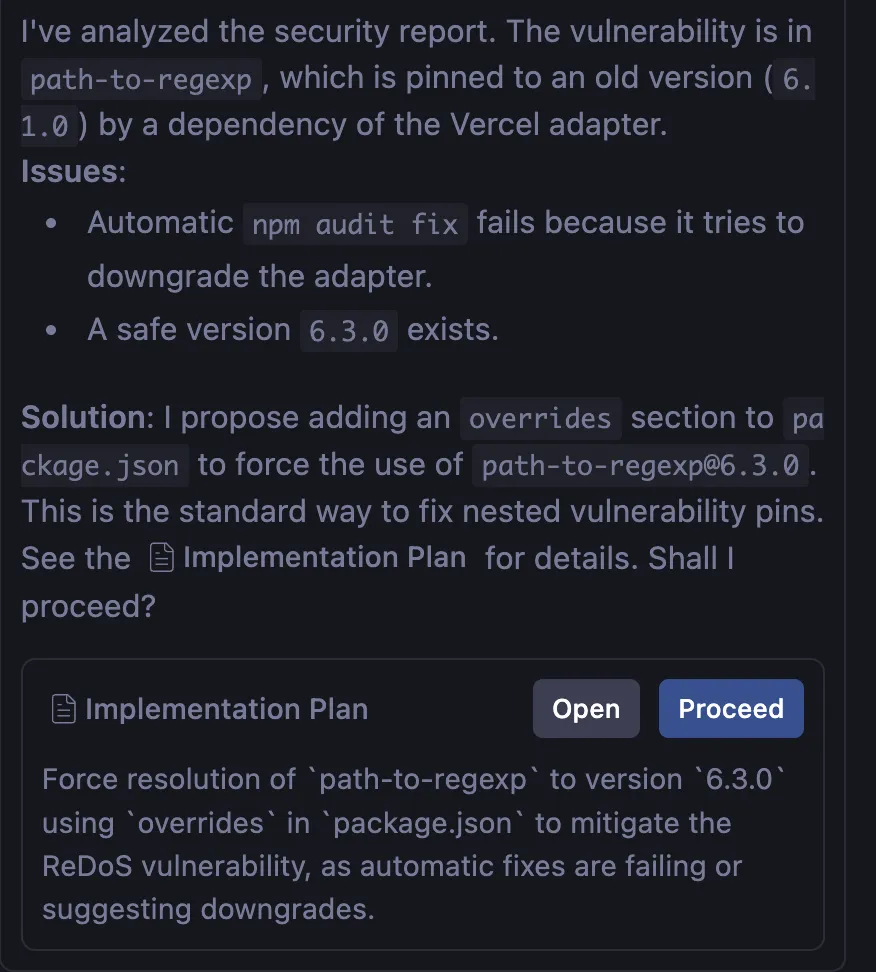
- Resolution Capability: In case of complex vulnerabilities (e.g., transitive dependencies), the agent is instructed to propose using
overridesinpackage.jsoninstead of simplenpm audit fixwhich might fail.
---
description: Check for security vulnerabilities using npm audit
---

# Security Auditor

This workflow audits the project dependencies for security vulnerabilities.

## Steps
1. Run `npm audit`:
   bash
   npm audit

2.solution
   - detail the issues
   - propose solution
   - create report in /report/yyyy-MM-DD_HH:mm_security_report.md

3. Analyze the report.
   - **Low/Moderate**: Noted, but may not block release depending on policy.
   - **High/Critical**: MUST be fixed before release. Run `npm audit fix` if possible.
EX:
3.3 Accessibility Agent (EAA)
- File:
check_accessibility.md - Role: A11y Tester.
- Tool:
@axe-core/playwright. - Function: Runs the test suite defined in
tests/accessibility.spec.ts. - Output on error:
- Generates a report in
/report/yyyy-MM-DD_HH:mm_accessibility_report.md. - Details violations (e.g., color contrast, missing aria-labels).
- Proposes specific corrective code (CSS/HTML).
- Generates a report in
---
description: Run accessibility checks using Axe and Playwright
---

# Accessibility Checker

This workflow runs automated accessibility audits against the application using `@axe-core/playwright`.

## Steps
1. Run the accessibility test suite:
   bash
   npx playwright test tests/accessibility.spec.ts

2. solution
- detail the issues
- propose solution
- create report in /report/yyyy-MM-DD_HH:mm_accessibility_report.md

3. Analyze the output. If tests fail, it means accessibility violations were found (e.g., low contrast, missing aria-labels).
3.4 Changelog Agent
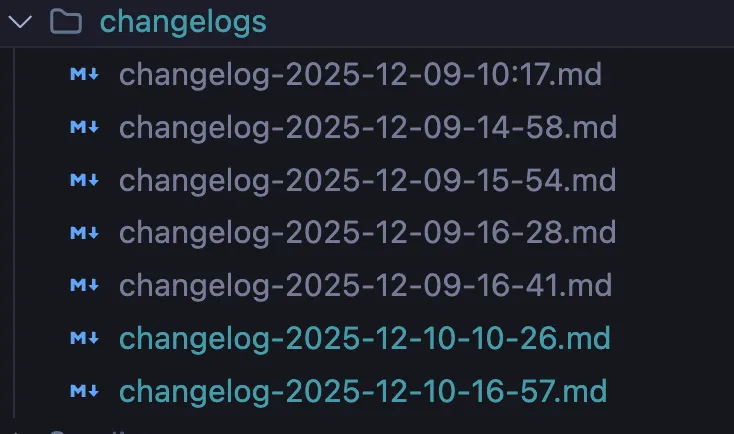
- File:
create_changelog.md - Role: Technical Writer.
- Function:
- Runs
git statusandgit diff. - If there are changes, generates a timestamped file in
changelogs/. - Semantically analyzes the changes to propose a structured Commit Message.
- Runs
- Integration: The changelog automatically includes references to security or accessibility fixes just applied by other agents.
---
description: Check for unpushed changes, create a changelog, and propose a commit message.
---

1. Check for unpushed changes
   - Run `git status --porcelain` to see if there are any changes.
   - If there are no changes, notify the user and exit.

2. Generate Changelog Content
   - Run `git diff` to get the changes.
   - Summarize the changes into a changelog format (bullet points).
   - Determine the current date and time in `yyyy-mm-dd-HH:mm` format.
   - Create a filename `changelogs/changelog-<timestamp>.md`.

3. Write Changelog File
   - Create the `changelogs` directory if it doesn't exist.
   - Write the summary to the new changelog file.

4. Propose Commit Message
   - Generate a concise commit message based on the changes.
   - Display the proposed commit message to the user.
   - Ask the user if they want to commit the changes with the proposed message.

5. Instructions for User
   - Tell the user they can invoke this agent by typing `@create_changelog` (or whatever name you give this file).
4. Usage Procedure
To start the pre-push process, invoke the orchestrator agent from the IDE chat or AI-enabled terminal:
- Command: Type or select
@prepare_push. - Monitoring: Follow the execution of the steps.
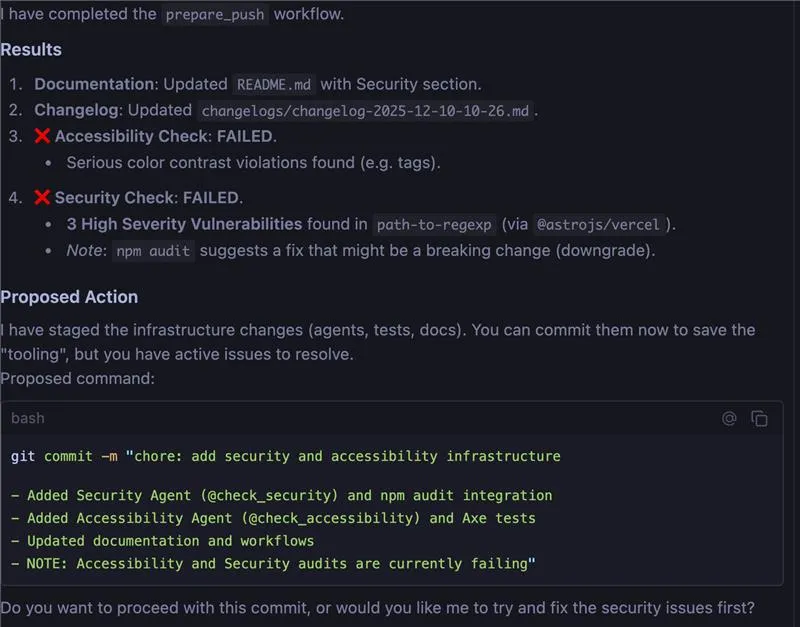
- If the Security agent detects critical errors (e.g., ReDoS in
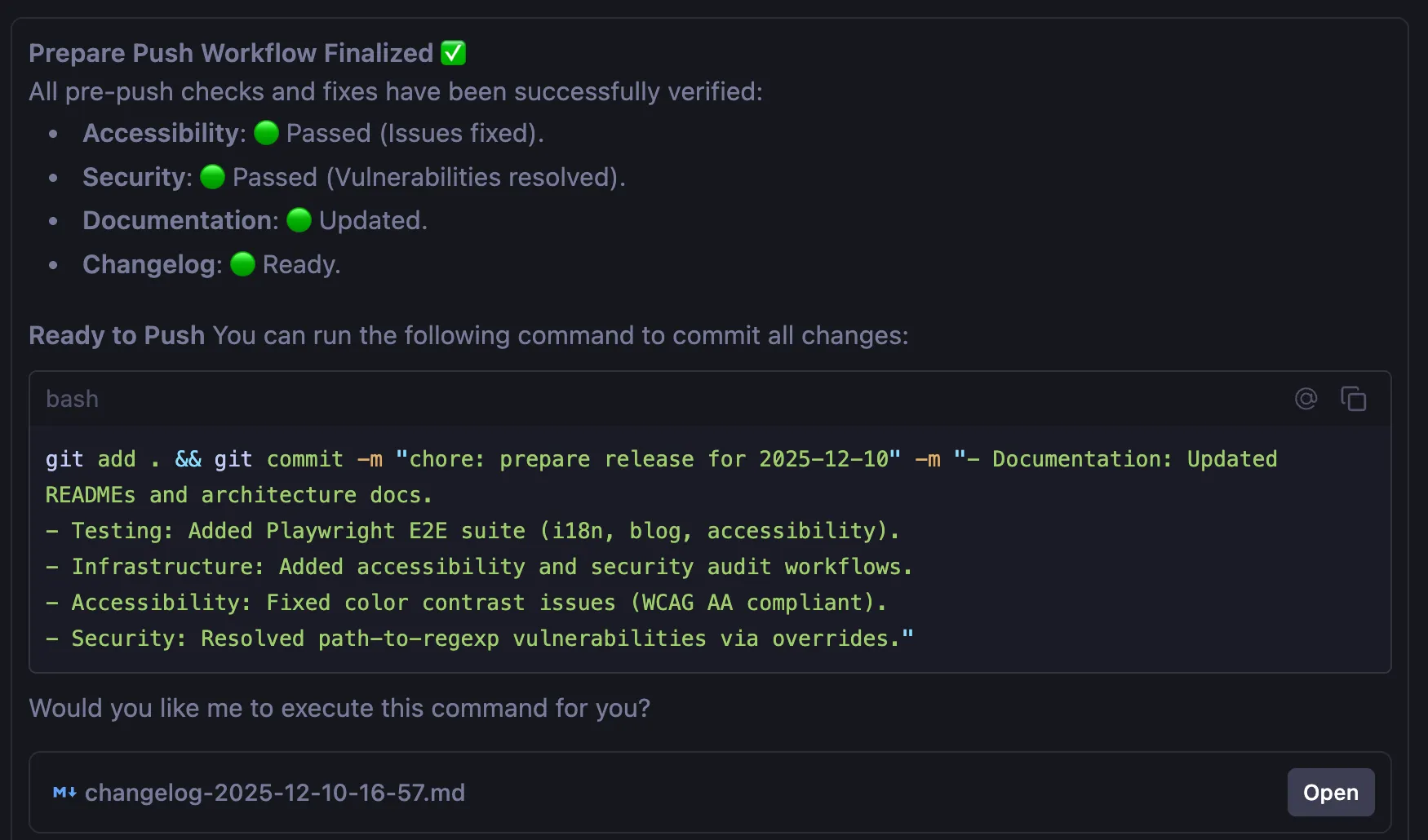
path-to-regexp), wait for the fix proposal (e.g.,overridessection) and confirm the application. - If the Accessibility agent fails (e.g., color contrast), apply the suggested CSS fix. The agent will update the changelog indicating “Accessibility issues resolved”.
- If the Security agent detects critical errors (e.g., ReDoS in
- Final Verification: Check the commit message proposed by the
create_changelogagent. - Execution: Confirm the commit and proceed with
git push.
Example of final result:
KO (Failed)
OK (Passed)
Conclusion: Towards an “Agentic” Developer Experience
Adopting this system doesn’t simply mean automating a list of bash commands; it means redefining the relationship between developer and IDE. By transforming simple Markdown files into active agents guided by orchestration, we shift the cognitive load of repetitive and “bureaucratic” checks from our brain to a reliable and tireless system.
The immediate benefits are tangible:
- Quality “by default”: Accessibility and security are no longer afterthoughts, but requirements verified and resolved automatically before even leaving the local environment.
- Living Documentation: Diagrams and specifications evolve in step with the code, eliminating the chronic misalignment between what the code does and what the documentation says.
- Clear Code History: Changelogs become precise and structured narratives of changes, without manual effort.
Ultimately, implementing these 5 agents allows you to focus on the only thing that truly matters: solving complex problems and creating value, while letting your “virtual colleagues” take care of keeping the repository clean, secure, and ready for release.